
How to Check Subscribers on YouTube (And Why the Public Count Is Always Rounded Down)
Your exact subscriber count exists in exactly one place, YouTube Studio. Every other number, including the one the API returns to every third-party tool, is truncated to three significant figures. Here is where to look, what you can see on someone else's channel, and who you can actually identify.
Published September 12, 2026
TL;DR
- Your exact subscriber count lives in one place only: YouTube Studio, Analytics, Overview tab, Realtime card, See live count.
- Every public count is truncated to three significant figures. A channel with 123,456 subscribers displays 123K, and keeps displaying 123K until it reaches 124,000.
- The YouTube Data API returns that same truncated number. Every third-party tool and every "live subscriber counter" is working from it, so none of them can be more precise than YouTube's own rounding.
- You can see who subscribed only if they made their subscriptions public, and only for the last 28 days. There is no way to see who subscribed to a channel you do not own.
- Closed accounts and subscribers identified as spam are removed from your total. That is the usual reason a count drops on its own.
Most articles on this question answer it in one line and stop: open YouTube Studio, look at the number. That part is true and it takes ten seconds.
What almost nobody mentions is that the number you are looking at and the number your audience sees are not the same number, and that the gap is documented by YouTube itself. Once a channel passes a million subscribers, the public figure only moves in steps of ten thousand.
That matters the moment you start comparing channels, quoting a figure in a sponsorship deck, or trusting a counter that ticks upward in real time.
Where your exact subscriber count lives
There is exactly one place: YouTube Studio.
- Sign in to YouTube Studio.
- In the left menu, select Analytics.
- On the Overview tab, find the Realtime card.
- Click See live count to view your subscriber count over time.
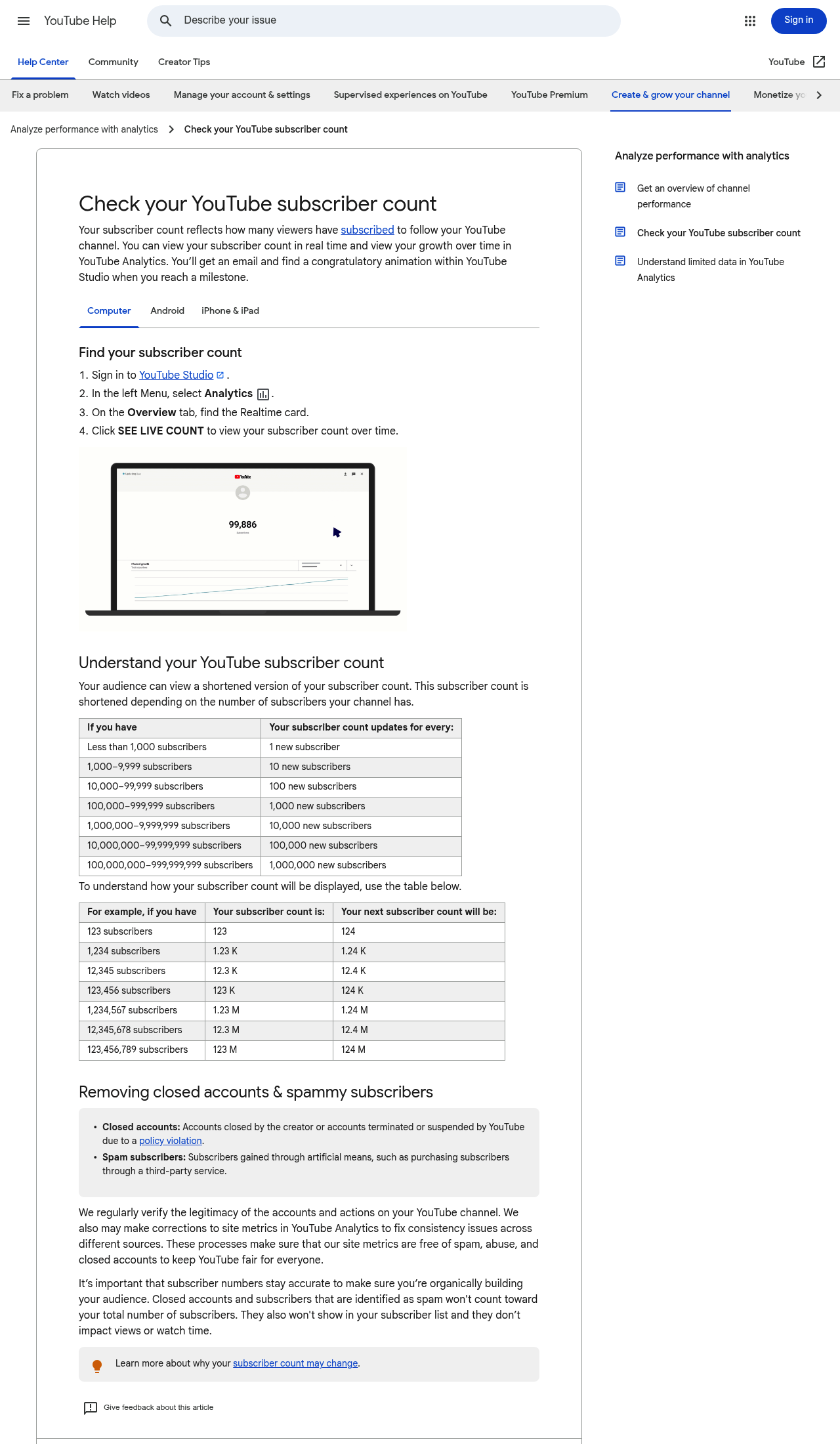
YouTube's own documentation. The steps at the top, and the two tables that explain why your audience sees a different figure.
This is not a detail of convenience. When YouTube changed how subscriber counts are reported in 2019, its developer revision history spelled out the consequence in one sentence: "Channel owners can still see exact subscriber counts in YouTube Studio." Everywhere else, the number is rounded.
So if you need your real figure, for a media kit, a contract, or simply to know where you stand against the 1,000-subscriber monetisation threshold, Studio is the only source. Our watch hours calculator covers the other half of that threshold, which is the part people usually get wrong. Worth knowing while you count: from 1 February 2027 the watch-hours half doubles to 8,000 hours, or 20 million Shorts views, for new applicants. The 1,000-subscriber figure itself does not change.
Why the count everyone else sees is not the real one
Your audience sees a shortened version of your subscriber count. YouTube publishes the exact rules.
| If you have | The public count updates every |
|---|---|
| Less than 1,000 subscribers | 1 new subscriber |
| 1,000 to 9,999 | 10 new subscribers |
| 10,000 to 99,999 | 100 new subscribers |
| 100,000 to 999,999 | 1,000 new subscribers |
| 1,000,000 to 9,999,999 | 10,000 new subscribers |
| 10,000,000 to 99,999,999 | 100,000 new subscribers |
| 100,000,000 to 999,999,999 | 1,000,000 new subscribers |
And the display itself keeps three significant figures:
| Actual subscribers | Displayed as | Next displayed value |
|---|---|---|
| 123 | 123 | 124 |
| 1,234 | 1.23K | 1.24K |
| 12,345 | 12.3K | 12.4K |
| 123,456 | 123K | 124K |
| 1,234,567 | 1.23M | 1.24M |
| 12,345,678 | 12.3M | 12.4M |
| 123,456,789 | 123M | 124M |
The critical word is down. The count is truncated, not rounded to the nearest value. A channel at 123,999 subscribers still displays 123K. It only becomes 124K when the real figure crosses 124,000.
That gives every public number a hidden band underneath it.
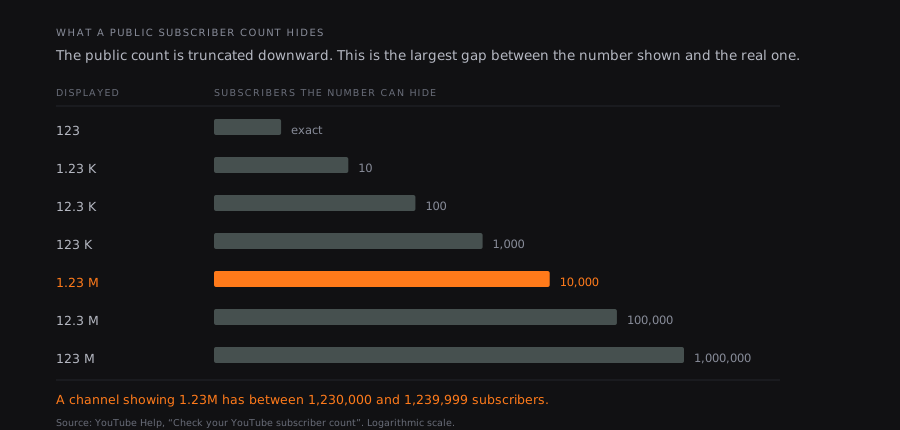
At every tier, the public number hides up to one full increment. A channel showing 1.23M has somewhere between 1,230,000 and 1,239,999 subscribers.
Two practical consequences.
A "live subscriber count" cannot be live. Above a million subscribers the underlying number only changes every ten thousand subscribers. A counter animating upward second by second is interpolating between two known points, not reporting anything.
Two channels showing the same number are not tied. One channel at 1.23M and another at 1.23M can be nearly ten thousand subscribers apart.
How to check another channel's subscriber count
For any channel that is not yours, you have two routes, and both end at the same rounded figure.
The channel page itself. The subscriber count sits under the channel name, in its shortened form.
Third-party tools. Social Blade, vidIQ, Viewstats and the rest read the YouTube Data API. So do we. And the API documentation is explicit about what it hands back:

The official API reference. Every tool that reports a subscriber count is built on this field.
The revision history adds that this applies to counts above 1,000, including authorised requests a channel owner makes about their own channel. In other words, even logging in does not get you a more precise number through the API. Only the Studio interface shows the exact figure.
This is worth keeping in mind when a tool advertises "exact" or "real-time" subscriber data. No public tool has access to a number YouTube does not publish.
What tools can legitimately add is history and context: growth over time, subscriber gains per month, and how the count relates to actual viewership. Our channel analytics tool reports the public figures alongside median views, which is the comparison that actually tells you something.
How to see who subscribed to you
You can see some of your subscribers by name, under two conditions.
- Sign in to YouTube Studio.
- On the Dashboard, find the Recent subscribers card.
- Click See all to expand it. From the top you can change the timeframe and sort by subscriber count.
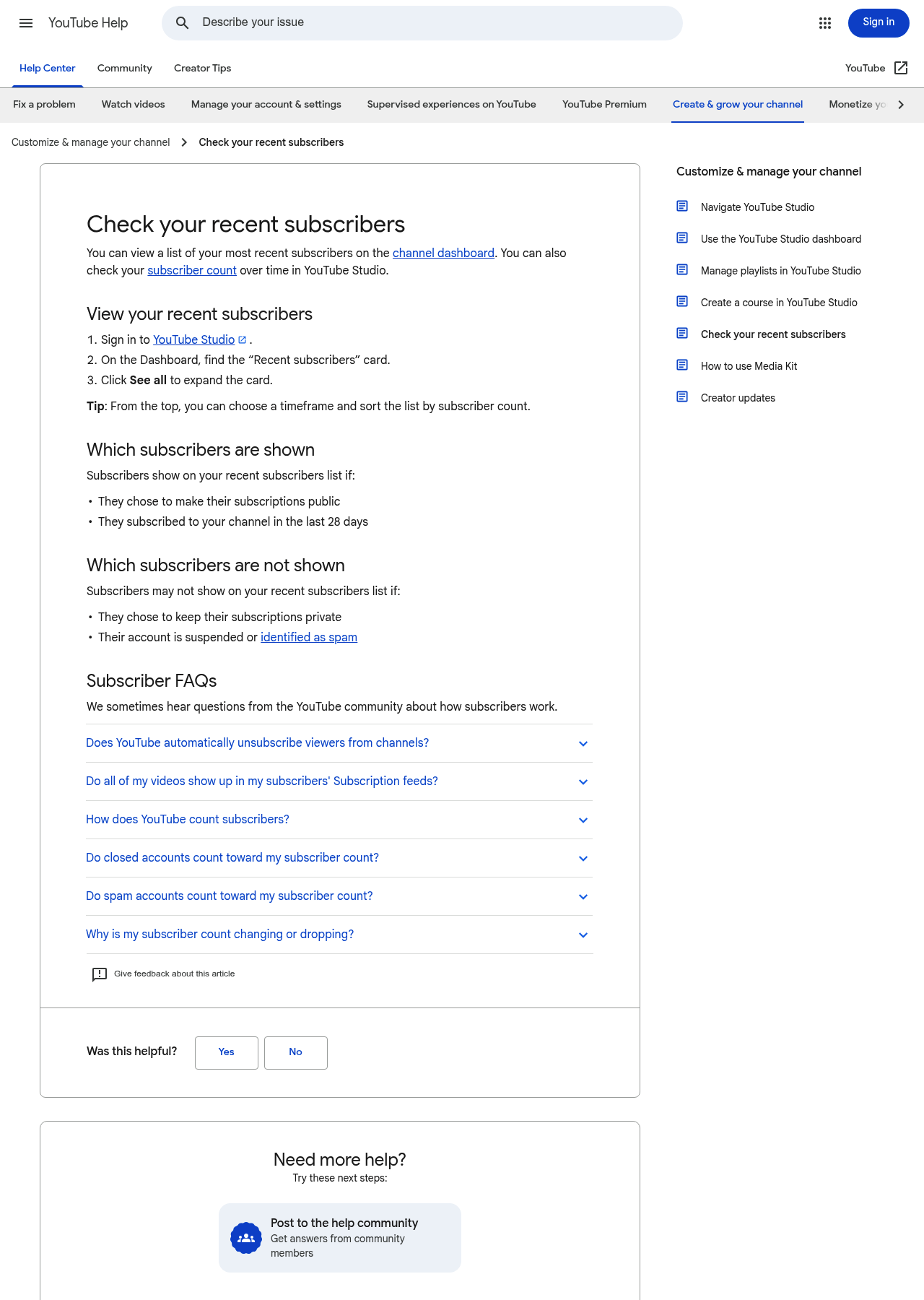
The conditions are strict, and they are the reason the list is always shorter than the count.
Subscribers appear only if they chose to make their subscriptions public and they subscribed in the last 28 days.
They do not appear if they kept their subscriptions private, if their account is suspended, or if they were identified as spam.
Since subscriptions are private by default on YouTube, the visible list is a small and non-random sample of your audience. Treat it as a courtesy feature, not as analytics.
And the answer to the question behind the question: there is no way to see who subscribed to a channel you do not own. No tool, paid or free, exposes that. Any service claiming otherwise is either showing you public subscription lists of individual accounts or making it up. The same wall stands around viewing activity generally, which is why nobody can pull up another person's comment history either.
Why your subscriber count goes down
A falling count with no unsubscribes is usually YouTube cleaning up rather than an audience leaving.
YouTube removes two categories from your total:
- Closed accounts, whether closed by the user or terminated for a policy violation.
- Spam subscribers, including subscribers gained through artificial means such as purchased subscriptions.
Two details matter here. These accounts do not appear in your subscriber list either, and their removal does not affect your views or watch time. So a drop in subscribers with flat views is the normal signature of a cleanup, not a sign that something broke.
This is also the quiet reason bought subscribers are worse than useless. They get removed, and in the meantime they drag down the ratio between your subscriber count and your actual viewership, which is the first thing an experienced buyer or collaborator checks. If you want to see what that looks like on a channel, our unusual engagement checker compares the public signals that tend to move together on organic channels and diverge on inflated ones.
The number that tells you more than subscribers
Subscriber count is the most visible metric on YouTube and one of the least informative. It is cumulative, so it records who once clicked subscribe, not who watches now. It is truncated, so you cannot track it precisely. And it says nothing about whether a video worked.
The measurement that survives all three problems is a video's views against the median of its own channel's recent videos.
The median matters rather than the average, because a single viral video drags an average so high that nothing ever looks exceptional again.
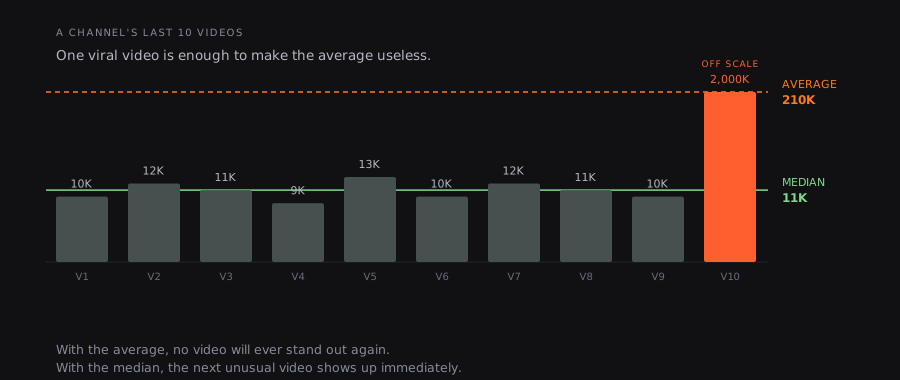
One video at 2,000K pulls the average to 210K on a channel whose typical video does 11K. The median stays at 11K and keeps working.
A video doing five times its channel's median is showing you a format that works, on any public channel, whether or not you own it and regardless of how many subscribers it has. That is a signal you can act on, and a 1.23M badge is not.
The method is set out in our guide to YouTube channel growth strategy, and what you can and cannot measure on a channel you do not own is covered in how to see YouTube analytics for other channels. If the reason you are counting subscribers is money, how much YouTube actually pays per view answers that with measured figures rather than advertiser CPM. Our monthly rankings of top YouTube channels by country apply the same comparison market by market.
FAQ
How do I check my subscriber count on YouTube?
Sign in to YouTube Studio, select Analytics in the left menu, open the Overview tab, find the Realtime card and click See live count. This is the only place your exact subscriber count is shown. The figure on your public channel page is a shortened version of it.
Why is my subscriber count not updating?
Most likely because the public count only updates in steps. Below 1,000 subscribers it moves with every new subscriber, but between 1,000 and 9,999 it only changes every 10 subscribers, between 10,000 and 99,999 every 100, and so on up to every million above 100 million subscribers. Your exact count in YouTube Studio keeps moving the whole time.
Can I see who subscribed to my channel?
Partly. In YouTube Studio, open the Dashboard, find the Recent subscribers card and click See all. The list only shows people who chose to make their subscriptions public and who subscribed in the last 28 days. Anyone with private subscriptions, a suspended account, or an account identified as spam will not appear.
Can you see another channel's exact subscriber count?
No. The public page and the YouTube Data API both return a figure rounded down to three significant figures, and that rounding applies even to authorised requests. A channel displaying 1.23M has between 1,230,000 and 1,239,999 subscribers, and no third-party tool can narrow it further, because no tool has access to a number YouTube does not publish.
Why did my subscriber count go down?
YouTube removes closed accounts and subscribers identified as spam from your total, including subscribers gained by artificial means. These removals do not affect your views or watch time, so a subscriber drop alongside stable views is the normal signature of a cleanup rather than an audience leaving.
Can you hide your YouTube subscriber count?
The API still carries a field indicating whether a channel's subscriber count is publicly visible, and a small number of channels do display no count. However, YouTube's current help documentation on subscriber counts describes no setting for turning this on. We found no official announcement fixing a date for its withdrawal, so the honest answer is that the option should be treated as unavailable rather than merely hard to find.
How many subscribers do you need to get paid on YouTube?
1,000 subscribers, plus either 4,000 valid public watch hours over 12 months or 10 million public Shorts views over 90 days, to join the Partner Program for ad revenue sharing. From 1 February 2027 that becomes 8,000 watch hours or 20 million Shorts views for new applicants. A lower tier at 500 subscribers unlocks memberships and Super Thanks in eligible countries, but not ad revenue, and that 500-subscriber bar is not moving.
Useful sources
- Check your YouTube subscriber count (YouTube Help), for the update thresholds, the display examples and the removal of closed and spam accounts.
- Check your recent subscribers (YouTube Help), for which subscribers appear in your list and which do not.
- Channels resource reference (YouTube Data API), for the definition of
statistics.subscriberCountand its rounding. - YouTube Data API revision history, 10 September 2019 entry, for the scope of the rounding and the Studio exception.