
How to See YouTube Analytics for Other Channels
YouTube keeps private analytics to channel owners. Here is what you can actually see for any channel, which free tools surface it, and how to spot the videos that massively overperform their baseline.
Published September 4, 2026
TL;DR
- YouTube keeps most analytics private. You can only see a channel's public data: subscriber count, total views, video count, and upload history.
- YouTube Studio gives full analytics (watch time, retention, revenue) but only for channels you own.
- Free third-party tools (Social Blade, vidIQ, Viewstats, YTFace) surface public channel stats for any channel without login.
- The most advanced method is tracking which videos massively overperform a channel's baseline. That is the signal that a format is breaking out before it spreads to other markets.
What YouTube analytics are publicly available for other channels
YouTube does not expose private analytics to the public. That is the baseline fact.
What you can access for any public channel:
| Metric | Publicly available? |
|---|---|
| Subscriber count | Yes, unless hidden by the creator |
| Total lifetime views | Yes |
| Video count | Yes |
| Channel creation date | Yes, via API-based tools |
| Estimated earnings | Estimates only, not real figures |
| Watch time | No |
| Audience retention | No |
| Traffic sources | No |
| Click-through rate (CTR) | No |
| Exact revenue | No |
The public data is enough to benchmark a channel's size, growth trajectory, and upload cadence. It is not enough to replicate a channel's internal performance dashboard. The same line separates channel data from viewer data: a comment history belongs to the account that wrote it, and no tool reaches into someone else's.
When you want to analyze a YouTube channel beyond these basics (video-level performance, outlier detection, format trends), you need third-party tools or a different methodology entirely.
Method 1: YouTube Studio (your own channel only)
YouTube Studio is the most complete free analytics tool available. It shows watch time, average view duration, audience retention curves, traffic sources, revenue, and subscriber gains per video.
The limitation is absolute: YouTube Studio only works for channels you manage. You cannot enter a competitor's channel ID and pull their private data. No workaround exists for this.
How to access it:
- Go to studio.youtube.com
- Select Analytics from the left sidebar
- Navigate between Overview, Content, Audience, and Revenue tabs
For your own channel, this is the only place where channel analytics are fully accurate. Every other method described below relies on public data or estimates.
Method 2: Free third-party tools to analyze any channel
These tools pull from YouTube's public API and display statistics for YouTube channels in a readable format. None of them access private data. All of them are free at the basic tier.
Social Blade
URL: socialblade.com
Social Blade is the most established free YouTube channel stats tracker for competitor research. It has been indexing public channel data since 2008.
What it shows for any public channel:
- Subscriber count and 30-day growth
- Total views and daily view gains
- Estimated monthly and yearly earnings (a range, not an exact figure)
- Upload history and frequency
- Channel grade and global ranking
- Future growth projections based on current trends
- Live subscriber count
Social Blade requires no login for basic lookups. Search by channel name or paste a channel URL. It is the fastest way to get a channel stats snapshot without creating an account.
Best for: growth benchmarking, earnings ranges, historical trends.
Limitation: no video-level data. Earnings are wide estimates. No outlier detection.
vidIQ YouTube Stats
vidIQ is a broader YouTube growth platform. Its free channel analytics feature lets you look up any public channel and see subscriber count, total views, and estimated performance metrics.
The free browser extension adds an overlay directly on YouTube pages, surfacing stats while you browse. No separate dashboard needed.
The free tier includes:
- A basic channel report for any public channel
- Keyword and tag data for individual videos
- Real-time stats overlay on YouTube
- Trending video discovery (limited)
- An SEO score for video optimization
The free plan caps keyword research at three results per search and restricts the full channel audit to paid tiers. Competitor tracking at scale requires a paid subscription.
Best for: quick on-page stats, SEO research, keyword discovery alongside channel data.
Limitation: deep competitor analysis and channel audit features are paywalled.
Viewstats
URL: viewstats.com
Viewstats was built by MrBeast's team and focuses specifically on video performance analysis. It works as both a web app and a Chrome extension.
What it shows:
- Channel overview: subscribers, total views, revenue estimates, global ranking
- Per-video performance curves (views over time)
- Upload analysis: recent videos with individual breakdowns
- Thumbnail and title change history
- Outlier detection: videos that outperform a channel's normal baseline
- Competitor comparisons
The Chrome extension surfaces these metrics directly while you browse YouTube. No tab switching required.
Best for: video-level performance analysis, outlier spotting on individual channels, thumbnail research.
Limitation: some channels are not yet tracked in the Viewstats database. Free depth is more limited than paid tiers.
YTFace
URL: ytface.com
YTFace is a lightweight, no-login tool combining channel analytics with monetization utilities. It is designed for fast lookups rather than deep research.
What it covers:
- Channel growth metrics and engagement stats
- Earnings estimation (monthly, yearly, lifetime)
- YouTube Partner Program monetization eligibility check
- CPM/RPM estimates across 200+ countries
- Per-video revenue estimation by niche and audience country
- Video tag and channel tag extraction
- Thumbnail download in multiple resolutions
Best for: quick earnings estimates, monetization checks, tag research.
Limitation: no historical growth charts, no competitor benchmarking, no outlier detection.
Quick comparison
| Tool | Channel stats | Video-level data | Outlier detection | Earnings estimate | Free tier |
|---|---|---|---|---|---|
| Social Blade | Yes | No | No | Yes (range) | Yes |
| vidIQ | Yes | Limited | Paid only | Limited | Yes |
| Viewstats | Yes | Yes | Yes | Yes | Yes |
| YTFace | Yes | Basic | No | Yes | Yes |
Method 3: Track outlier videos across channels (advanced)
Free tools answer the question: how big is this channel?
The more valuable question is: which videos on this channel are massively overperforming, and why?
A video that gets 10× the normal views for its channel is not luck. It is a format signal. The topic angle, thumbnail structure, or hook has connected with an audience in a way the algorithm rewards. That pattern tends to repeat, and it tends to migrate across markets.
How outlier detection works
The common shortcut is the views-to-subscriber ratio: total views on a video divided by the channel's subscriber count. A ratio of 1× is normal, 5× is a strong indicator, 10× is a breakout.
A more reliable approach compares a video's views against the channel's median views across recent uploads in the same format (long-form versus Shorts). The median matters more than the average here: one old viral video drags an average upward for years and quietly hides every genuine outlier that follows.
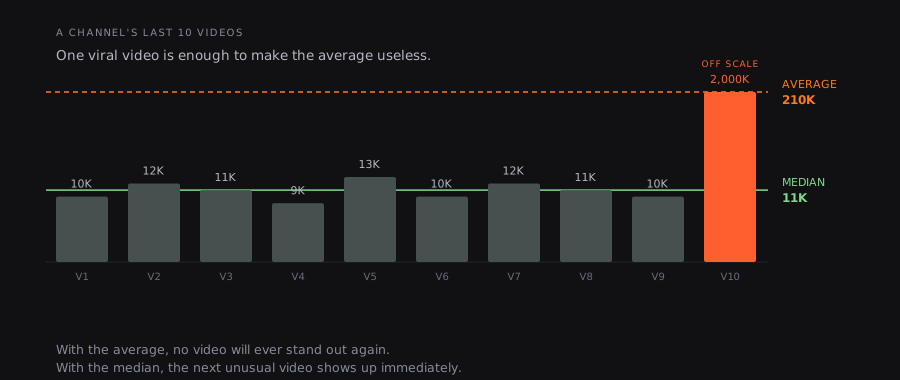
One viral video is enough to make the average useless. The median keeps working.
Practical thresholds. These are analyst conventions, not YouTube rules, and no official threshold exists:
| Ratio vs. channel median | Signal |
|---|---|
| 1× | Normal performance |
| 2–3× | Mild outlier, worth noting |
| 5× | Strong format signal |
| 10× and above | Breakout: investigate immediately |
| 50× and above | Rare, highly distinctive outlier |
Why this matters for competitive intelligence
A format that breaks out in Germany or Brazil often shows up in English-language channels weeks or months later. Nobody has published a reliable measurement of that delay, so treat any article quoting a precise window with suspicion. What is observable is the direction: formats travel, and the market where a format is already saturated is rarely the one where it started.
Manual tracking across dozens of channels in multiple languages is not feasible. The creators who gain an edge are the ones who automate this detection.
VideoTrends is built for exactly this. Point it at any public YouTube channel, in any language, and it re-measures the channel every four hours, flagging the videos that massively overperform their own channel's baseline. When a format starts breaking out in a foreign-language market, the signal surfaces before that format reaches your own.
This is not the same as checking free analytics on a single channel. It is systematic, cross-market outlier detection: the difference between reacting to trends and anticipating them.
If you want the reasoning behind the median rather than the average, and what YouTube has actually confirmed about how videos get recommended, that is covered in our guide to YouTube channel growth strategy. You can also see the method applied to live data in our monthly rankings of top YouTube channels by country.
For a one-off look at a single channel, our channel analytics tool reads its public numbers without an account. And if the question behind yours is what those views are worth, we cover how much YouTube pays per view separately.
What metrics actually matter when analyzing another channel
Most people look at subscriber count first. It is the least useful metric for competitive intelligence, and it is truncated before it ever reaches you.
Metrics that actually matter:
- Average views per video (last 20 uploads). This is the real baseline for a channel's current reach. All-time averages are distorted by old viral videos.
- Views in the first 48–72 hours: early algorithmic momentum. High early velocity signals strong title and thumbnail performance, and real audience demand.
- Engagement rate: likes plus comments divided by views. It normalizes audience connection across channels of different sizes.
- Upload frequency. Consistency affects visibility. A channel posting three times a week at 200K average views outpaces one posting monthly at 500K.
- Outlier ratio: which videos get 5× or more of the channel's median views. These are the format signals worth reverse-engineering.
- Subscriber-to-view efficiency: how many views a channel generates per 1,000 subscribers. Declining efficiency signals audience fatigue or format stagnation.
Metrics to deprioritize:
- Total subscriber count: a lagging indicator
- All-time total views: skewed by old content
- Estimated earnings: wide ranges, rarely actionable
When you analyze a competitor's channel, run through this list in order. Start with recent average views, not the subscriber number at the top of the page.
FAQ
Can you see another channel's YouTube Analytics?
No, not the private analytics. YouTube Studio data (watch time, retention, traffic sources, revenue) is only visible to the channel owner. What you can access for any public channel is the public data: subscriber count, total views, video count, and upload history. Third-party tools like Social Blade and Viewstats surface this public data in a more usable format, and some add earnings estimates based on view counts and average CPM rates.
What is the best free tool to check YouTube channel stats?
It depends on what you need. Social Blade is the strongest option for growth history and subscriber trends, with no login required and fast lookups. Viewstats is better for video-level performance and outlier detection. vidIQ adds SEO and keyword data alongside channel stats. For a quick earnings estimate, YTFace or Social Blade both provide ranges. None of these tools access private analytics. They work from public data only.
How do you find out how much a YouTube channel makes?
You cannot find the exact figure. That data stays in YouTube Studio and is private to the creator. What you can get are estimates. Tools like Social Blade and YTFace calculate a revenue range from a channel's public view count and average CPM rates by niche and country. These ranges are often wide, because CPM varies significantly by advertiser, season, and audience geography. Treat estimates as order-of-magnitude indicators, not precise figures.
What is a YouTube outlier video?
An outlier video is one that significantly overperforms a channel's normal baseline, typically 5× or more of the channel's median views on recent uploads. It is not simply a video with a high absolute view count. A video with 500K views on a channel that normally gets 50K is a far stronger signal than a video with 2M views on a channel that routinely hits 1.5M. Outlier videos matter because they reveal formats, topics, and presentation styles that the algorithm and the audience are actively rewarding. Those patterns tend to spread across markets and creators over the following weeks.
Useful sources
- YouTube Help: understanding your analytics
- YouTube Help: audience retention report
- Social Blade: YouTube channel stats tracker
- vidIQ: YouTube stats and channel analysis
- Viewstats: YouTube video and channel analytics
- YTFace: channel analytics and earnings estimator
- Sprout Social: YouTube competitor analysis metrics