
YouTube comment history: where it is, and the four cases it never shows
Your comment history lives at one URL, and YouTube documents exactly two reasons a comment disappears from it. There are at least four. Here is what the help page covers, what it leaves out, and why no tool can pull up a stranger's comments.
Published September 18, 2026
The short version
- Your comment history has one address: youtube.com/feed/history/comment_history. YouTube's help page links straight to it and describes no menu path at all.
- The help page names two reasons a comment is missing: you commented on a deleted video, or YouTube removed it for a policy violation.
- There are at least four. A comment held for review sits in the creator's Studio for up to 60 days, and a comment caught by a channel's blocked-word filter never appears publicly. YouTube documents neither from your side.
- You can see a stranger's latest comments on the channel you are watching, through their profile card. There is no way to see everything they have written across YouTube.
- The API has no author filter. Every "comment finder" tool scans video by video, so none of them can be exhaustive.
Most articles about this answer in one line: open your comment history, scroll. That is correct, and it takes ten seconds.
What almost none of them explain is what happens when the comment you are looking for is not there. YouTube's own help page covers two of those cases and stays silent on the others, which is precisely when people start searching.
Where your comment history actually lives
One URL, and only one:
youtube.com/feed/history/comment_history
YouTube's help page links directly to it three times. What it does not contain is any mention of a hamburger menu, a History section, or a Comments tab.
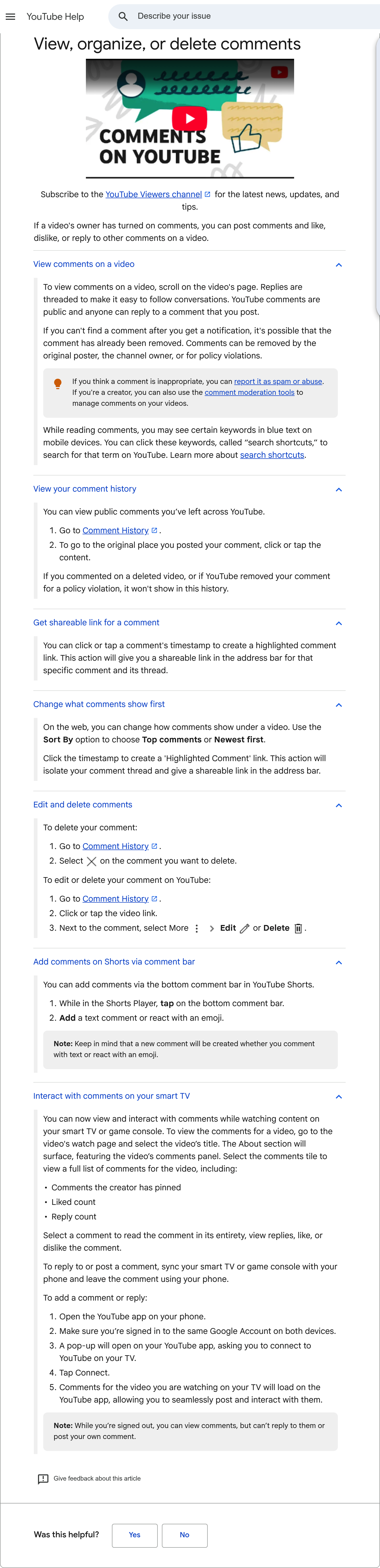
The official page. Two steps, one link, and a single sentence about what will not appear.
That matters because a large share of the guides ranking on this question walk you through a menu path. Whether that path still exists in your interface or not, the page YouTube maintains describes neither the desktop route nor a mobile one. It gives an address and tells you to click a comment to jump back to where you posted it.
If the page loads empty while you are signed out, that is expected: the history is tied to your Google Account and the URL redirects to sign-in.
The two cases YouTube documents
The help page is unusually precise here, so it is worth quoting exactly:
If you commented on a deleted video, or if YouTube removed your comment for a policy violation, it won't show in this history.
Two situations, both irreversible from your side:
The video is gone. The creator deleted it, or YouTube removed it. Your comment went with it. Nothing in your history preserves the text you wrote.
YouTube removed the comment. Automatic detection systems scan comments continuously, and a comment can also be removed after a viewer reports it. Spam signals include posting many comments in a short window, repeating the same comment, sharing links, and heavy use of emoji or unusual characters.
The two cases it does not
Here is the part worth reading, because no page on the SERP covers it and YouTube's own documentation stops short.
A comment held for review. Creators can set their channel to hold comments for approval. Those comments sit in YouTube Studio for up to 60 days and are not publicly visible unless the creator approves them. YouTube documents this from the creator's side. It says nothing about what you see from yours.
A comment caught by a blocked-word filter. A channel owner can block specific words. A comment containing one never surfaces publicly. Again, documented as a moderation tool, never from the author's point of view.
So four situations can make a comment vanish, and the help page addresses two. That gap is not a detail: a held comment is the single most common reason someone goes looking for a comment that "disappeared" a few hours after posting it, and it is the one case where the comment is not actually lost.
We looked for an official page stating whether a held or filtered comment still appears in your own history. We did not find one. Forum threads report that the author keeps seeing their own comment while nobody else does, which would explain a lot of confusion, but we found no YouTube source confirming that behaviour and will not present it as fact.
What you can see of someone else
This is where most answers are simply wrong, in both directions.
You can see some of a stranger's comments. YouTube documents profile cards, and the wording is specific:
Their basic channel info (name, picture, handle, pronouns) · The latest comments that they've made on the channel that you're watching · Their subscriptions, if they've chosen to make them public
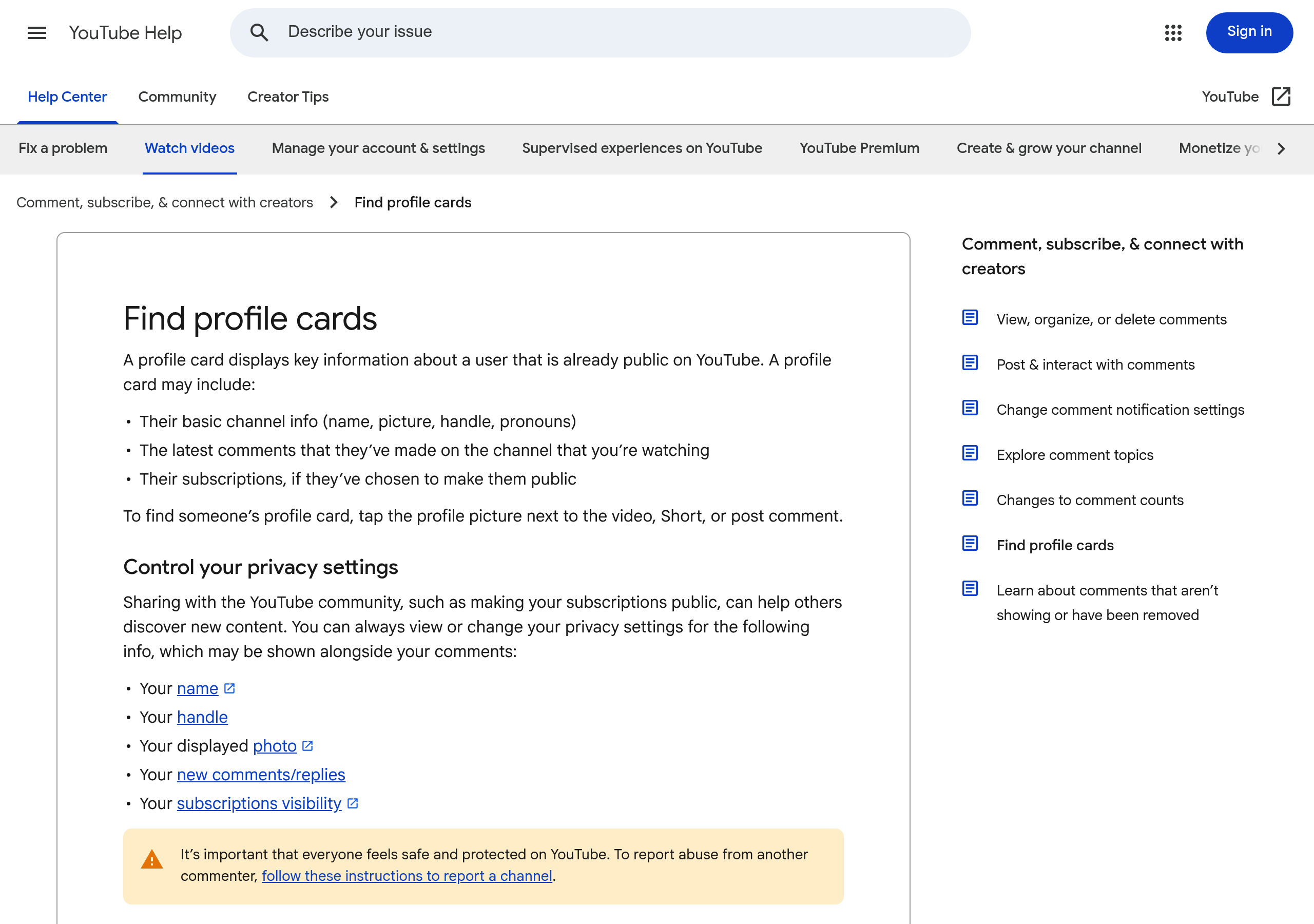
The scope is the sentence in the middle: on the channel you are watching. Not across YouTube.
Read it carefully. The view is scoped to one channel. You see what that person wrote on the channel currently open, not their history anywhere else. Tap their profile picture next to a comment on a video, a Short or a post.
You cannot see everything someone has written across the platform. No official surface offers that, and the reason is structural rather than a policy choice, as the next section explains.
You will find claims that profile cards were discontinued in 2023. The help page describing them is still published and maintained, so we are not repeating that claim.
Why no tool can pull up a stranger's full comment history
This one is worth understanding, because it explains an entire category of tools that promise something they cannot deliver.
The YouTube Data API exposes comments through commentThreads.list, and that endpoint requires exactly one filter among three: a video ID, a comment ID, or allThreadsRelatedToChannelId.
That third one is the trap. "Related to channel" sounds like "written by this channel". It means the opposite: it returns the comment threads on that channel's videos, in other words the comments the channel received.
There is a searchTerms parameter, but it filters on the text of comments, inside a video or channel you have already chosen. It does not search by person.
So there is no author filter anywhere in the API. Any tool claiming to find everything a given person has commented has to scan videos one by one and match the name, which means its results are bounded by whatever it happened to scan. It cannot be exhaustive, and it has no way of telling you what it missed.
That is the same reasoning we apply to subscriber counts: when the API rounds or restricts something, every tool built on it inherits the limit, no matter what its marketing says.
What deleting your channel does
Worth knowing before you go looking for a delete button, because YouTube separates two actions that people often confuse.
Hiding a channel is reversible. It makes your name, videos, likes and subscriptions private.
Deleting a channel is permanent, and the help page lists what goes: videos, comments, messages, playlists, and history. It also notes that deleting a channel does not delete your Google Account, and that aggregate data such as watch time stays in reports without being attributed to the deleted channel.
We looked for the automatic retention periods that circulate widely (3, 18 or 36 months). Google documents the auto-delete mechanism for account activity and warns that "some activities may disappear faster than the time frame you choose", but we found no official page listing those periods for YouTube comment history. We are not repeating numbers we could not source.
FAQ
Where is my YouTube comment history?
At youtube.com/feed/history/comment_history, while signed in to the account you commented with. YouTube's help page links directly to that address and describes no menu path. Clicking a comment takes you back to the video where you posted it.
Why is a comment missing from my history?
YouTube documents two reasons: the video was deleted, or the comment was removed for a policy violation. Two more situations exist that YouTube does not document from your side, a comment held for review by the creator and a comment caught by a channel's blocked-word filter. A held comment stays in the creator's Studio for up to 60 days and appears publicly only if approved.
Can I see someone else's comment history?
Partly. A profile card shows the latest comments that person made on the channel you are currently watching, plus their public subscriptions if they chose to share them. There is no official way to list everything someone has commented across YouTube.
Do YouTube comment finder tools work?
Not in the way they suggest. The YouTube Data API has no filter for the author of a comment: it only accepts a video ID, a comment ID, or a channel whose received comments you want. Any tool has to scan video by video and match a name, so its coverage is limited to what it scanned and it cannot be complete.
How long does YouTube keep my comments?
Comments stay until you delete them, the video is deleted, or YouTube removes them. Deleting your channel permanently removes your comments along with your videos, playlists and history. We found no official page stating an automatic retention period for comment history.
Does editing a comment change anything in my history?
No. You can edit or delete from the history itself: open Comment History, then use the More menu next to a comment to edit or delete it. The entry reflects the current text.
Useful sources
- View, organize, or delete comments (YouTube Help), for the comment history address and the two documented exceptions.
- Find profile cards (YouTube Help), for what a profile card shows and how far its scope reaches.
- Learn about comments that aren't showing or have been removed (YouTube Help), for automatic detection, reports and channel moderation.
- Learn about comment settings (YouTube Help), for the 60-day window that applies to held comments.
- commentThreads.list (YouTube Data API), for the three accepted filters and the absence of any author filter.
- Delete or hide a YouTube channel (YouTube Help), for what hiding preserves and what deleting removes.
The pattern here is the one we keep running into: a platform documents what it needs to document, tools built on its API inherit every limit it sets, and the gap between the two fills up with confident guesses.
It is the same reason we measure every video against the median of its own channel rather than against a platform-wide benchmark that nobody can verify. If you want to see what that looks like on a channel you do not own, our channel analytics tool reads only public data and says so, and our country rankings show the same measurement applied market by market.